RealValue Portfolio
Analyze CAS PDFs and IBKR CSVs in one dashboard. Auto-extract holdings, compute transaction-based XIRR (INR/USD), review allocation views, and export cashflows for independent verification.
Overview
Gain clarity on your mutual fund investments by parsing your combined CAS directly in your browser. Tag each holding with custom Categories, Asset Classes, and Statuses, which are automatically saved to your browser’s local storage for future reference.
Key Features
| Feature | Description |
|---|---|
| 100% Private | PDF parsing happens entirely in your browser; your financial data never leaves your device. |
| Auto-Extraction | Automatically pulls out your holdings, folios, ISINs, and current market values. |
| Custom Tagging | Create and assign custom Categories and Asset Classes to group related funds together. |
| Status Tracking | Mark funds to “Buy”, “Hold”, or “Sell” to keep your portfolio strategy clear. |
| Visual Summary | Get instant aggregated views and charts of your entire portfolio broken down by Asset Class and Category. |
Full Capability Matrix
| Capability | What It Does |
|---|---|
| CAS PDF Parsing (CAMS/KFinTech) | Parses consolidated CAS PDFs (including password-protected files) directly in the browser and extracts folio-wise holdings, units, NAV, market value, and cost value. |
| IBKR CSV Parsing | Parses Interactive Brokers activity/open position CSV data for stock holdings, cost basis, market value, trades, and account mapping. |
| Unified Portfolio View | Combines CAS and IBKR holdings into one table with consistent tagging, valuation display, and status workflow. |
| Transaction-Based XIRR (Not Manual Input) | Computes XIRR from actual transaction cashflows plus terminal value; supports fund-level and aggregated report-level computation. |
| INR + USD Analytics for IBKR | Computes and displays both INR and USD values/XIRR for IBKR holdings where transaction history is available. |
| Historical FX Conversion | Converts IBKR transaction cashflows to INR using SBI historical TT Buy rates on transaction date (or previous available date). |
| Invested Value Integrity for IBKR | Uses open-lot FIFO-based invested value estimation (transaction-date FX adjusted) so invested vs market vs XIRR are more internally consistent. |
| NAV + Date Display | Shows NAV per unit and valuation date with market value context; IBKR supports INR and USD NAV display. |
| Quantity Reconciliation Guardrails | Skips/flags XIRR when parsed transaction quantity does not reconcile with reported holdings quantity. |
| Category / Asset Class / Status Tagging | Lets you tag each holding with your custom Category, Asset Class, and Buy/Hold/Sell status. |
| Allocation Report Modes | Provides overview and category-scoped asset-class breakdowns with table + chart visualization. |
| Persistent Local State | Saves funds, tags, and settings in browser local storage for continuity across sessions/uploads. |
| Download Transactions CSV | Exports normalized cashflow rows (TRANSACTION + TERMINAL) in INR/USD for offline XIRR verification in Excel/Sheets/Python. |
Exported Transactions CSV Format
The Download Transactions button exports one row per normalized flow with these columns:
fundId, fundName, source, folioNo, isin, category, assetClass, currency, flowType, date, amount
Where:
flowTypeis eitherTRANSACTIONorTERMINALcurrencyisINRand (for IBKR where available)USDamountuses sign convention suitable for XIRR: investments as negative outflows and terminal/redemption as positive inflows
Usage Guide
1. First-Time Setup (Full History Upload)
For accurate XIRR and invested-value computation, your first upload should include complete transaction history from the first transaction date.
1a. CAS (Mutual Funds)
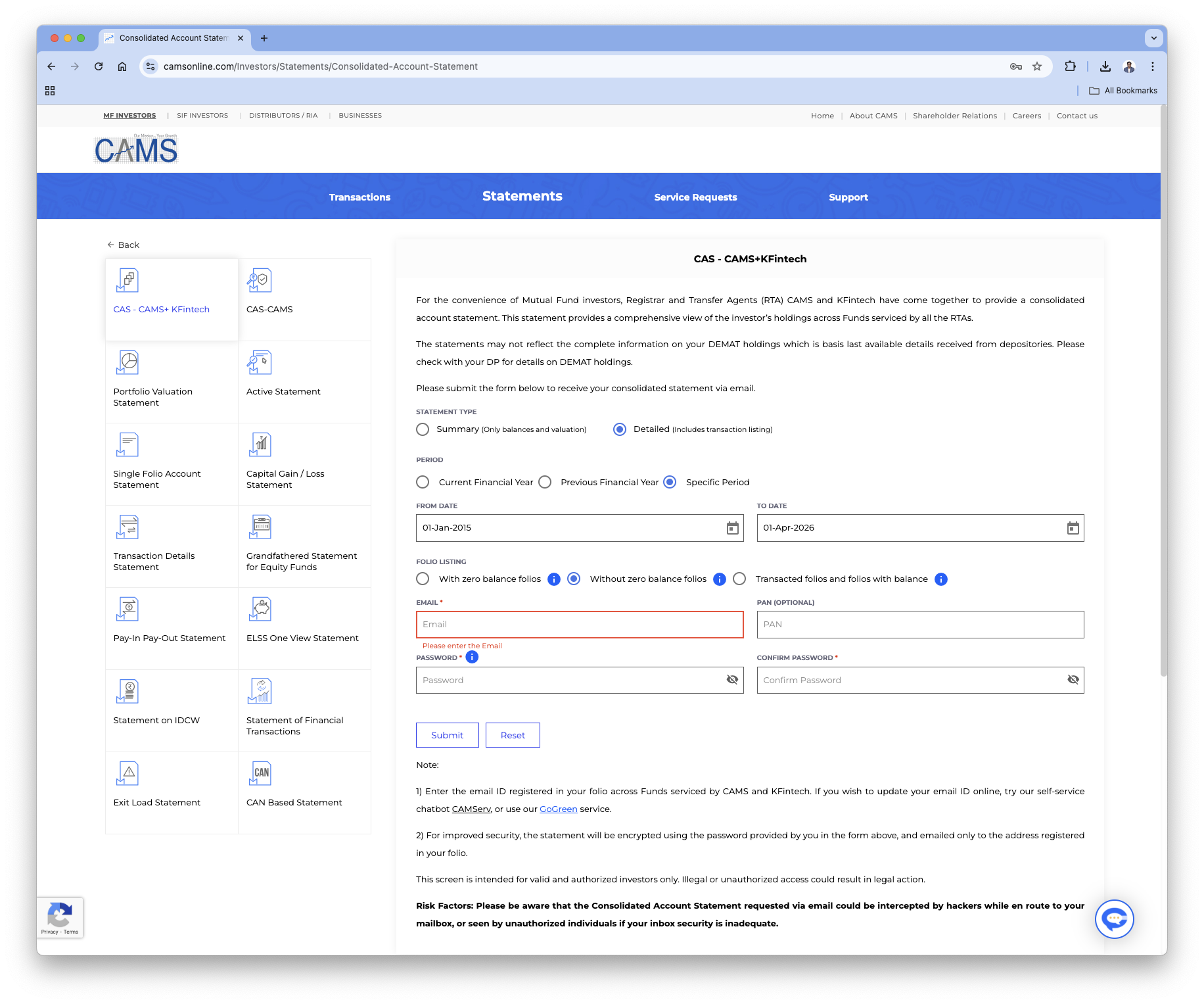
- Visit the CAMS CAS Request Page.
- Request a Detailed statement (not Summary).
- Select a period starting from your earliest transaction date.
- Download the CAS PDF (password-protected is fine).
- Use Upload CAS PDF in this tool and enter the password if required.
1b. IBKR (International Holdings)
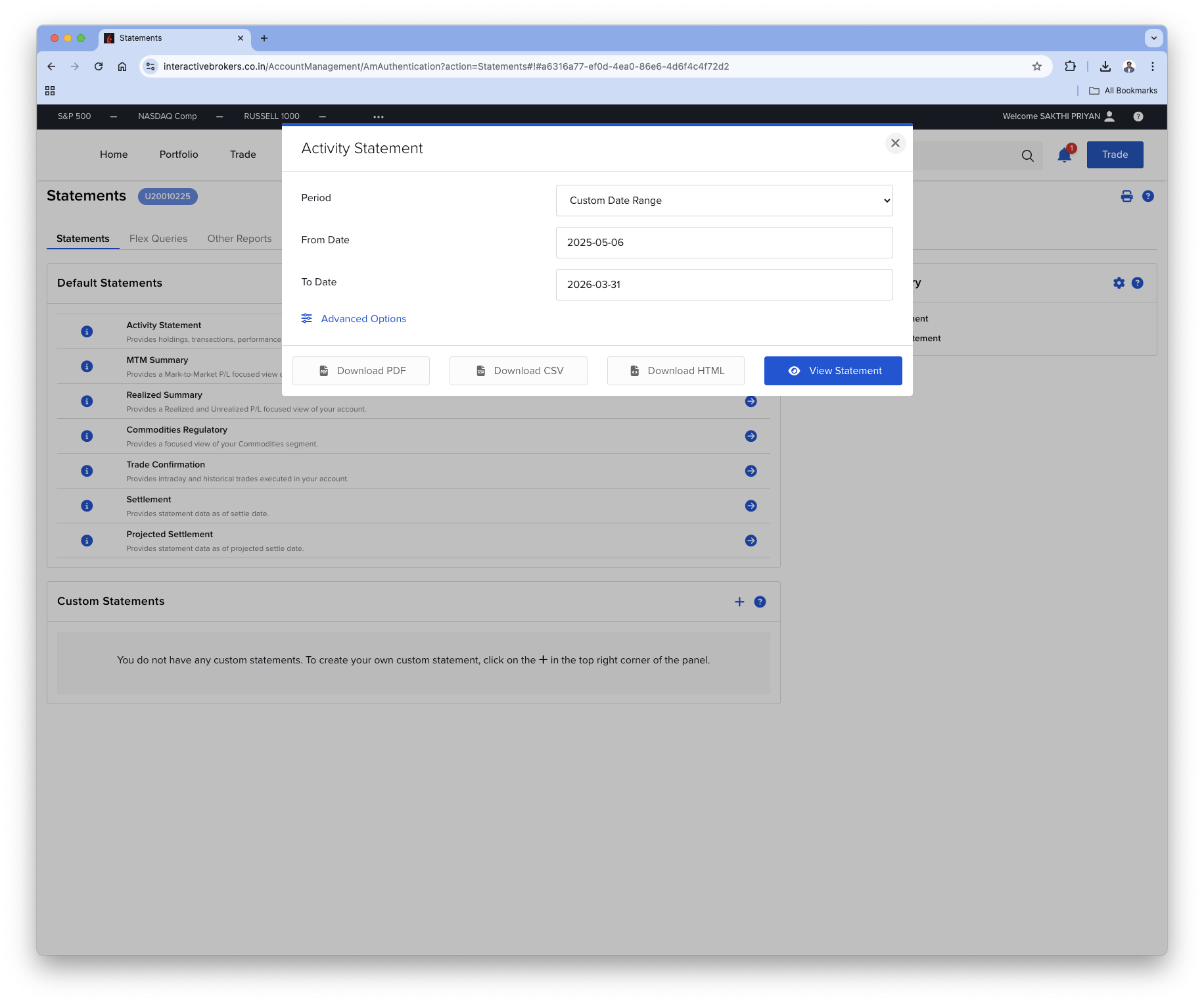
- Generate an IBKR statement/CSV that includes trade history from the first transaction date.
- Ensure the export includes open positions and trades.
- Use Upload IBKR CSV in this tool.
2. Ongoing Updates (Current-Year Incremental Upload)
After the first full-history upload, you can upload only the current year or latest period.
- The tool merges by fund and replaces overlapping dates with the latest uploaded records.
- This lets you keep data fresh without re-uploading entire historical files every time.
- Recommended cadence: monthly refresh before making new investments, so RealValue Family SIP Allocator can be used with the latest portfolio state.
3. Tagging Holdings
Add these tags to each fund/holding:
- Category: e.g., Emergency, Travel, Core Portfolio, Retirement
- Asset Class: e.g., Nifty 50, Nasdaq 100, Debt, Gold
- Status: Buy, Hold, or Sell
Tags are stored in your browser and auto-applied on future uploads when the holding identity matches.
4. Reviewing Reports
Use Allocation Report to review:
- Category-level overview
- Asset-class breakdown within each category
- Market value, invested value, NAV context, allocation %, and XIRR
- Table + chart view toggle
5. Exporting Transactions for Offline Verification
Use Download Transactions to export normalized cashflows used by the analytics engine.
You can verify results offline in:
- Excel / Google Sheets (
XIRR) - Python / R (
xirrlibraries) - Your own audit scripts
Privacy & Data Source Note: Portfolio file parsing and core computation run in your browser, and portfolio documents are not uploaded by this tool. For IBKR INR conversion, historical SBI reference rates are read from JSON endpoints published at data.sakthipriyan.com. You can verify all network calls in your browser dev tools.